
A marketing page workflow should help your team launch campaigns, update messaging, and improve conversions without turning every small website change into a development project.
Yet, in many B2B SaaS companies, updating a headline, adding a customer story, or launching a new landing page can require the same process as shipping a product feature. Marketing submits a request, engineering reviews it, priorities compete for attention, and a simple update waits in the backlog.
This usually happens because teams use one process for two different kinds of work. Product developers have roadmaps, technical tasks, and deadlines of their own. They need time to build and maintain the product, while marketing needs to keep the website and campaigns up to date.
Over time, this setup can slow down campaigns, delay conversion improvements, and leave marketing teams waiting for developers to make routine changes. It can also push teams toward quick fixes that lead to inconsistent designs, tracking issues, and extra technical work later.
A better marketing page workflow gives marketing more freedom while keeping engineering involved where technical skills matter. The goal is to make website updates easier to publish, safer to maintain, and easier to measure.
Why Marketing Page Updates Get Stuck in the Product Backlog
When marketing page updates follow the same process as product features, they compete for time with work that may have a higher priority on the engineering roadmap.
A marketing team might need to change a headline before a campaign launches, add a new customer story, or test a landing page. However, the request may wait days or weeks while developers work on product releases, bug fixes, and technical projects.
These delays affect more than publishing dates. A campaign may launch with outdated messaging, a useful conversion improvement may sit on hold, or a small change may miss its window entirely.
The issue often comes from the workflow, not the people involved. Marketing requests often compete with product work because engineering backlogs are built around product priorities. Developers need to protect their time for complex technical work, while marketers need a reliable way to make approved website changes.
A dedicated marketing page workflow helps separate routine website updates from product development.
It gives each type of work a clear path, with the right people involved at the right time.
For example, changing a headline should usually be a simple content update. Adding a new feature that connects to an application API may need engineering input. Treating both requests the same way creates extra work for everyone.
Marketing Pages Have Different Requirements From Product Features
Product features and marketing pages support different goals. Product teams focus on functionality, reliability, and user needs. Marketing teams focus on messaging, campaigns, lead generation, and conversion rates.
Those goals affect how each type of work should move through a team.
| Area | Product features | Marketing pages |
|---|---|---|
| Main goal | Improve the product experience | Attract, inform, and convert visitors |
| Common changes | Application logic, APIs, and user features | Headlines, landing pages, testimonials, and campaign content |
| Priorities | Product roadmap, customer needs, and reliability | Campaign dates, messaging, and conversion opportunities |
| Publishing process | Development, testing, and release | Content review, quality checks, and publishing |
| Success measures | Product usage, reliability, and retention | Leads, conversions, engagement, and campaign results |
These are common patterns, not fixed rules. A complex landing page with custom integrations may need substantial engineering work, while a small product copy change may be easy to publish.
The important thing is to match the process to the work. A marketing page workflow should let teams handle routine updates quickly while keeping the right technical checks in place for more complex changes.
Build a Marketing Page Workflow That Fits the Work
A useful workflow gives every website request a clear path from the first idea to the final results. It should also make ownership, review needs, and expected turnaround times easy to understand.
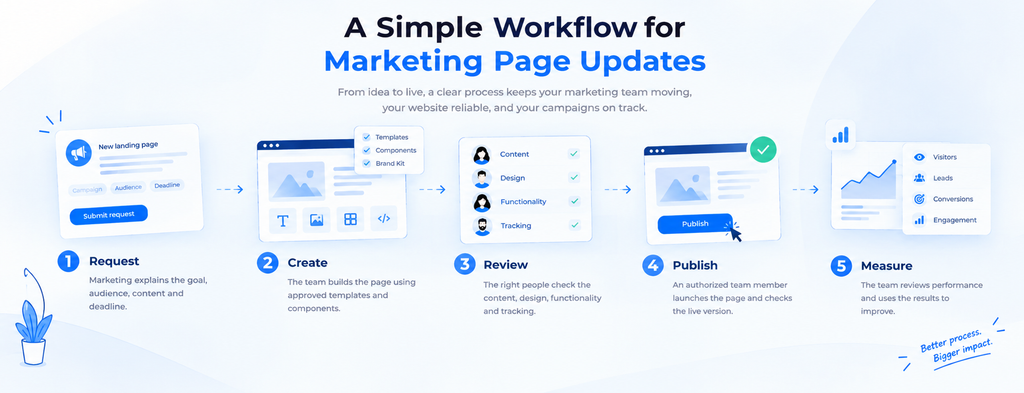
A simple process can include five stages:
- Request: Marketing explains the goal, audience, content, and deadline.
- Create: The team builds the page using approved templates and components.
- Review: The right people check the content, design, functionality, and tracking.
- Publish: An authorized team member launches the page and checks the live version.
- Measure: The team reviews performance and uses the results to guide future changes.
Not every request needs the same level of review. A headline change may only need a quick content check, while a new lead form could require testing, analytics checks, and an engineering review.
Clear ownership also prevents requests from getting lost. Marketing should know who prepares the page, who approves the content, and who can publish it. Engineering should know when a request needs technical review.
With these steps in place, a marketing page workflow becomes easier to follow and less dependent on ad hoc requests.
Give Marketing Reusable Components, Not Unlimited Freedom
Marketing teams need room to create pages that fit different campaigns. However, building every page from scratch can lead to inconsistent layouts, repeated work, and more maintenance for developers.
Reusable components offer a practical way to balance speed and consistency. These can include:
- Testimonials and customer story blocks
- Product comparison tables
- Customer logo sections
- FAQs and call-to-action blocks
- Lead forms and contact sections
When the team uses approved components, marketers can assemble pages without rebuilding common elements each time. Developers can maintain those components in one place, making it easier to fix issues and improve the overall design.
Still, reusable components need clear rules. Teams should document which parts marketers can edit, what they can customize, and when a new component requires engineering support.
The right setup depends on the website platform and the team’s needs. A content management system (CMS) with flexible page templates may offer enough control for routine updates. More complex pages may still need custom development.
The goal is to give marketing useful tools and clear boundaries, so the team can work independently without creating avoidable technical problems.
Set Clear Publishing Permissions and Quality Checks
A good marketing page workflow should explain who can edit, review, and publish each type of change. These permissions help teams move quickly while protecting the website from mistakes.
For example, marketers may be able to edit page copy and use approved components. Engineering may handle shared templates, JavaScript, complex integrations, and changes that affect security or site-wide behavior.
This setup keeps routine work moving while giving technical changes the attention they need.
Use a Simple Pre-Publish Checklist
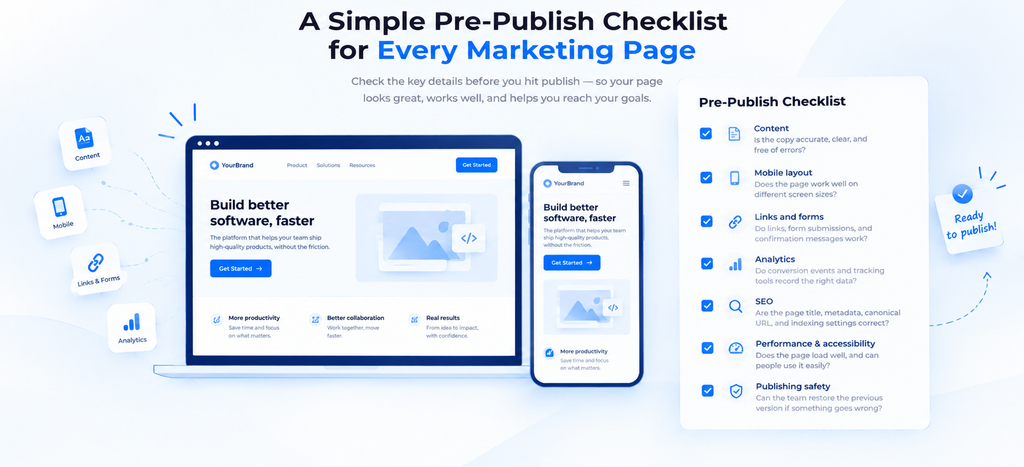
Before publishing a landing page, check the areas that can affect visitors, conversions, and search visibility.
- Content: Is the copy accurate, clear, and free of errors?
- Mobile layout: Does the page work well on different screen sizes?
- Links and forms: Do links, form submissions, and confirmation messages work?
- Analytics: Do conversion events and tracking tools record the right data?
- SEO: Are the page title, metadata, canonical URL, and indexing settings correct?
- Performance and accessibility: Does the page load well, and can people use it easily?
- Publishing safety: Can the team restore the previous version if something goes wrong?
For Google’s guidance on making pages eligible to appear in search results, review the Google Search Essentials guidelines.
Not every update needs a full technical review. A small text change may need only a quick check, while a new form or custom integration deserves more testing.
After publishing, someone should check the live page to confirm that it looks right and works as expected. This final step can catch problems that were missed during review.
Measure Whether Your Marketing Page Workflow Is Working
A marketing page workflow should make publishing easier, but teams need a way to tell whether it is helping. A few useful measures can show where delays remain and whether the process is improving.
Start with the time it takes to move from a request to a live page. If routine updates still wait in the backlog, the team may need clearer ownership or a simpler approval process.
It also helps to track how often campaign deadlines are missed, how many issues appear after publishing, and whether forms and conversion events work as expected.
Conversion rates matter, too, but they need context. A page may attract more visitors while generating fewer qualified leads. Teams should look at campaign goals, lead quality, and tracking reliability alongside conversion numbers.
Use these results to improve the workflow over time. If content reviews cause delays, clarify who approves copy. If pages often break on mobile, improve the shared templates or pre-publish checks.
The aim is not to add more reporting. It is to understand where the process slows down and make the next update easier to ship.
Final Thoughts
Marketing teams should not have to choose between publishing quickly and keeping their website reliable. A clear marketing page workflow helps them handle routine updates, launch campaigns on time, and test new ideas without sending every small request to engineering.
The key is to give each team clear responsibilities, provide reusable components, set sensible publishing permissions, and apply quality checks that match the work. Engineering can protect the technical foundations while marketing gets more control over everyday website updates.
For B2B SaaS companies, this is an important part of WebOps: keeping the marketing website useful, reliable, and ready to support business goals.
Seeing these patterns at your company?
Book a free WebOps Diagnostic. I'll review your site before the call and share specific observations.
Book a Free Call →Frequently Asked Questions
A marketing page workflow is the process a team follows to plan, create, review, publish, and measure website updates. It defines who handles each step, which changes need approval, and what checks must happen before a page goes live. A clear workflow helps marketing teams publish updates with fewer delays and fewer avoidable errors.
Marketing pages and product features have different goals, deadlines, and technical needs. Routine page updates often need a quick review, while product features may require development, testing, and release planning. A dedicated marketing page workflow helps teams publish campaign updates faster while keeping engineering involved in changes that need technical expertise.
Teams can use a CMS, approved page templates, and reusable components to handle routine website changes. Clear publishing permissions and simple guidelines also help marketers understand what they can update on their own. Developers can then focus on shared components, complex features, integrations, and technical issues that need their attention.
Teams should review the content, mobile layout, links, forms, analytics, SEO settings, performance, and accessibility. They should also confirm that the correct page version is live and that a rollback is possible if an issue appears. The depth of the checks should match the type and risk of the change.
A B2B SaaS company should assign clear responsibility for its marketing website. Marketing usually owns messaging, campaign priorities, and conversion goals, while engineering maintains technical standards and handles complex changes. A WebOps lead can connect these responsibilities, improve the publishing process, and help the website support the company's growth goals.
